The desk in unit 509B is an ergonomic comfort desk with clever features to alter between sitting or standing position. It has dual motors that elevates the desk to your desired position. You can set a memory for the low and high position so it is quick to alter between positions. This desk is a delicate equipment so please don’t put luggage or heavy load on it. Don’t sit or lay on it. The desk has a control panel with four buttons:
Ensure there are no obstacles below or above the desk before changing its height.
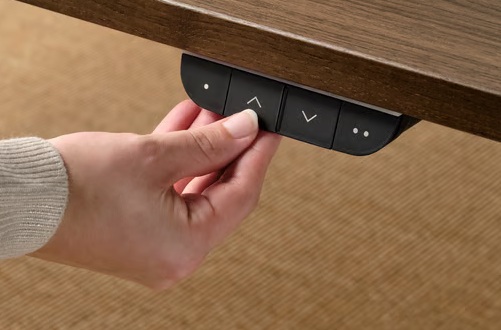
- The arrow up raises the desk.
- The arrow down lowers the desk.
- Button with one dot (to the left): This is the lower position memory button. Put the desk at desired height for sitting position. Press and hold the button 3-4 seconds until a white light blinks twice. A short press on this button will now make the desk return to this position.
- Button with two dots (to the right): This is the upper position memory button. Put the desk at desired height for standing position. Press and hold the button 3-4 seconds until a white light blinks twice. A short press on this button will now make the desk return to this position.
There are some extra functions that may also cause confusion:
- If the height of the desk has been changed many times in a short time the desk may time out to cool the engines. A blue light will be shown when this happens. This time out will last aproximately 20 minutes and is a normal function to protect the desk.
- Pressing and hold the two midddle up-down buttons for 3-4 seconds until a red double blink is seen. The desk is now locked and nothing happens when you press any button. This function may come handy if you have children who like to press any buttons. To unlock the desk press and hold the two midddle up-down buttons for 3-4 seconds until a green double blink is seen.